


Website Optimization for Search Engines
On-Page and Off-Page SEO Techniques to Improve Your Site's Google Ranking
Let's be honest—having a website without SEO in today's world is like opening a store in the middle of nowhere. If people can't find you on Google, you're basically invisible. And invisible means no traffic, no customers, and no sales. SEO isn't some magic trick—it's a strategic, ongoing process that helps you get found, builds trust, and ultimately grows your business.
In this guide, I'll walk you through the real On-Page and Off-Page SEO techniques that actually work. No fluff, no nonsense—just practical stuff you can use.
What is SEO and Why is it Important?
SEO stands for Search Engine Optimization. In plain English, it's a set of techniques that help Google understand what your website is about and show it to people who are searching for what you offer.
Why bother with SEO?
- More organic traffic (free visitors!)
- Less money spent on ads
- Builds brand authority and trust
- Better conversion rates
- Attracts the right people—not just anyone
Unlike paid ads that stop working the moment you stop paying, SEO is a long-term investment. It keeps paying off over time.
Part One: On-Page SEO
On-page SEO is everything you do on your own website to rank better. It's like making sure your house is clean, organized, and welcoming before inviting guests over.
1. Keyword Research
This is where it all starts. You need to know exactly what your potential customers are typing into Google.
What to focus on:
- Your main keywords (the big ones)
- Long-tail keywords (more specific phrases)
- How hard it is to rank for each keyword
- What users actually want when they search
Example: if you're in web design, your keywords might be:
- Website optimization
- E-commerce SEO
- Improve Google ranking
- Professional SEO training
Once you have your keywords, use them naturally in your content, headings, and descriptions. Don't stuff them—just use them where they make sense.
2. Title Tag Optimization
Your title tag is basically your first impression on Google. And we all know first impressions matter.
A good title should:
- Include your main keyword
- Be interesting enough to click on
- Stay between 50-60 characters
- Be unique—no copying others
Remember, your title is the first thing people see in search results. Make it count.
3. Meta Description Optimization
Meta descriptions don't directly help you rank higher. But they do help people click on your result instead of someone else's.
What makes a good meta description:
- Around 140-160 characters
- Includes your keyword
- Makes people want to click
- Gives a quick, appealing summary of what's inside
Think of it as your elevator pitch. Short, sweet, and convincing.
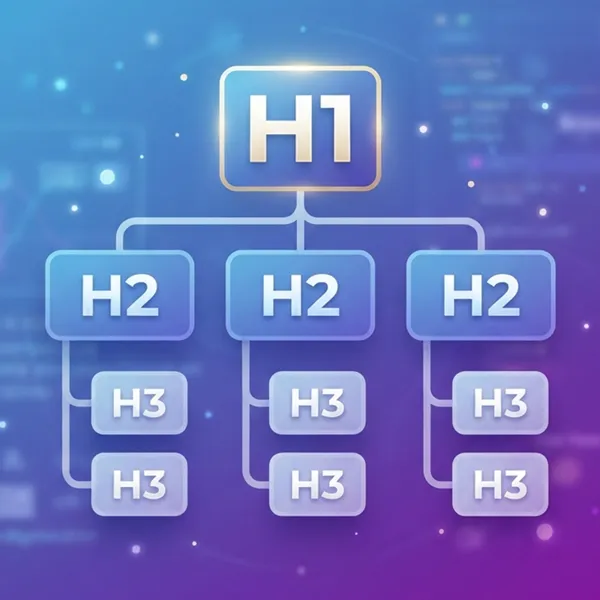
4. Proper Heading Structure (H1, H2, H3)
A well-structured page is easier for both users and Google to understand.
The rules are simple:
- One H1 per page (your main title)
- H2 for your main sections
- H3 for subsections under those
Good structure is like a good outline—it keeps everything organized and makes your content easy to scan.
5. Creating Valuable and In-Depth Content
Google doesn't like thin, shallow content. And honestly, neither do users.
Your content should be:
- Comprehensive and complete
- Helpful—it should answer real questions
- Practical and actionable
- Current and up-to-date
- Unique—not copied from somewhere else
Generally, content over 1,000 words tends to perform better, but only if it's actually good. Length alone won't save you if the quality isn't there.
6. Image Optimization
Images make your content more engaging. But they can also slow your site down if you're not careful.
Optimize your images by:
- Compressing them so they're lightweight
- Adding Alt Text so Google knows what they show
- Using descriptive file names (not "IMG_1234.jpg")
- Making sure they're relevant to your content
Alt Text is especially important—it helps Google understand your images and can even get them shown in image search results.
7. Internal Linking
Internal links are links from one page on your site to another. They're small but mighty.
Why internal linking matters:
- Keeps users on your site longer
- Spreads authority around your pages
- Strengthens your most important pages
- Helps Google index your site better
Link related pages together and use descriptive anchor text. It's good for users and good for SEO.
8. Website Speed Optimization
Speed matters—a lot. Google has made that clear. And users? They won't wait around for a slow site.
Tools to check your speed:
- Google PageSpeed Insights
- GTmetrix
- Pingdom
Ways to speed things up:
- Use a CDN (like Cloudflare)
- Compress your images
- Enable browser caching
- Reduce HTTP requests
- Get better hosting
I've seen sites transform just by switching hosting and compressing images. Don't overlook this one.
9. Mobile Friendliness
Google now uses Mobile-First Indexing. That means they look at the mobile version of your site first. If your site isn't mobile-friendly, you're in trouble.
Make sure your site has:
- A responsive design that adapts to any screen
- Readable fonts without zooming
- Buttons that are easy to tap
- Good speed on mobile devices
Test your site on your own phone. If it's annoying to use, fix it.
10. Schema Markup
Let's be honest—schema won't shoot you to the top overnight. But if you've ever spent hours on a post only to see it show up as a boring plain link, you know the frustration. Schema fixes that.
A few years ago, I ran an e-commerce site with zero schema on products. Google showed just titles and descriptions. Added schema? Suddenly prices, stock, ratings, and review counts appeared. My CTR jumped about 30%. Google doesn't officially say schema boosts rankings, but when more people click, Google notices—and rankings slowly follow.
Schema types I've actually used:
Article Schema: For blogs and guides over 1,000 words. Tells Google this is real content.
Product Schema: Mandatory for stores. Shows price, stock, and product ID. I once forgot it for a new product—my competitor with a higher price outranked me just because they had schema!
FAQ Schema: Great for service pages. Users click more confidently when they see answers right under your link. But warning—Google now says only use this if you genuinely have a real FAQ page.
Review Schema: Shows star ratings in results. Even 3.5 stars beats no stars.
Pro tip I learned the hard way: code it correctly. I once used http:// instead of https:// and Google ignored everything. Always test with Google's Rich Results Test before publishing.
Off-Page SEO
On-page SEO is cleaning your house. Off-page is what your neighbors think of you. You can write amazing content, but if nobody links to you, Google treats you like a lonely island.
I once wrote for an educational site—great content, zero backlinks. Three months later? Still page two. Started guest posting, podcast interviews, and social media. Gradually, others linked to us naturally. Two months later, key keywords hit page one.
What actually works for me:
Create link-worthy content. Instead of "how to do SEO," I write original research like "Common hosting mistakes 90% of beginners make." Fresh, citeable content attracts links naturally.
Reach out personally. I don't ask for links. I send emails like "Loved your post. Wrote a complementary piece your readers might like—if you enjoy it, feel free to link." About 20% say yes.
Be active on social media. Twitter and LinkedIn help writers discover you. I've gotten links without even asking this way.
List in reputable directories. Only real ones with human reviews—not spammy junk.
Critical warning: Never buy links or do shady exchanges. A client once bought 50 spam links without telling me. Their domain disappeared from Google for six months. Not worth it.
Bottom line: off-page SEO is a marathon. Do one small thing weekly—guest post, reach out, create something fresh. Over time, your authority grows, Google starts loving you, and good rankings come without the struggle.
1. Backlink Building
Backlinks are basically votes of confidence from other websites. When a reputable site links to you, Google sees it as a sign that your content is trustworthy and valuable.
But here's what you need to know:
- Quality beats quantity every single time. One link from a major site is worth more than 100 links from random blogs.
- Focus on getting links from reputable, trusted sites in your industry.
- Stay far away from spammy link schemes—they'll hurt you more than help.
- Aim for links from different domains, not the same site over and over.
I've seen a single backlink from an authoritative site completely transform a page's ranking. It really can be that powerful.
2. Guest Posting / Sponsored Articles
Writing articles for other websites in your field is one of the most effective ways to build links and get exposure.
What makes a guest post actually work:
- It needs to feel natural, not forced or overly promotional.
- The content should be genuinely valuable to that site's readers.
- Any links you include should make logical sense within the context.
Don't just write for the link—write to provide value. The links will follow naturally when you do it right.
3. Social Media Engagement
Social signals aren't a direct ranking factor—Google has made that pretty clear. But that doesn't mean social media is useless for SEO.
Being active on social media leads to:
- More visibility for your content
- Increased brand awareness
- Natural links from people who discover you
When more people see and share your content, the chances of someone linking to it go way up. So don't ignore social media—just don't expect it to directly boost your rankings.
4. Branding and Brand Name Searches
When people search for your brand name specifically, it sends a positive signal to Google. It tells them your brand is real, recognized, and trusted.
Simple equation:
Strong brand = More trust = Better rankings
Build your brand, and the SEO benefits will follow.
5. Local SEO
If you have a physical location or serve a specific area, local SEO is non-negotiable.
What you absolutely need to do:
- Create and fully optimize your Google Business Profile.
- Encourage customer reviews—they build trust and help you rank locally.
- Add quality images of your business.
- Make sure your contact information is complete and accurate.
Local searches often lead to actual foot traffic. Don't miss out on that.
Combined Strategy for SEO Success
Here's the truth—no single tactic will get you to the top. You need a combination of everything we've covered.
To truly succeed, you need to:
- Do thorough keyword research from the start
- Create content that's actually useful and in-depth
- Optimize your site structure so it's clean and logical
- Make sure your site loads fast
- Build high-quality links consistently over time
- Track your performance with tools like Google Search Console
And remember—SEO is never "done." It's an ongoing process that requires patience, consistency, and a willingness to adapt.
Conclusion
Website optimization comes down to two things: On-Page and Off-Page SEO. You can't have one without the other.
Without valuable content and a solid site structure, link-building won't get you very far. And without external authority and backlinks, even the best content might never get seen.
The winning formula:
- Choose the right keywords
- Fix your technical site structure
- Improve the user experience at every step
- Build high-quality links over time
Do all of that strategically, and you'll improve your Google ranking and attract sustainable, targeted traffic that actually converts.
FAQ (Frequently Asked Questions)
How long does SEO take to show results?
This is probably the most common question I get. And honestly? There's no single answer. Generally, you'll start seeing some movement in 3 to 6 months. But real, sustainable results? That takes 6 to 12 months or even longer. It depends on your niche, competition, and how much effort you put in. I've seen sites jump to page one in 4 months, and others take over a year. SEO is a marathon, not a sprint—patience is key.
Is SEO free or does it require investment?
Technically, you can do SEO for free. You can research keywords, write content, and build links yourself. But in reality, SEO requires investment. Whether it's your time, hiring experts, or buying tools like Ahrefs or SEMrush, there's always a cost. Think of it this way: you're either paying with your time or your money. Most successful businesses invest in both.
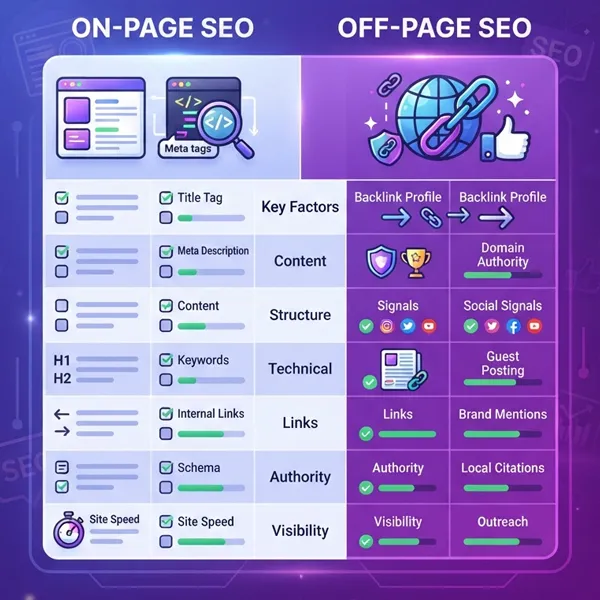
What is the difference between On-Page and Off-Page SEO?
Here's the simplest way I explain it: On-page SEO is everything you do on your website—content, keywords, headings, speed, and structure. It's like making your house clean and organized. Off-page SEO is everything outside your site—backlinks, social media, brand mentions. It's like what your neighbors and community think of you. You need both. Great content without backlinks won't rank. And backlinks without quality content won't keep you there.