


Introduction
In the previous part of this tutorial, we showed you how to create the foundation of your website with Webruno, choose a suitable template, and start building your online presence without coding.
In this second part, we will continue the website creation process and focus on customizing your website to match your brand and business needs.
You will learn how to edit your website content, customize different design elements, adjust sections and layouts, and create new pages from scratch using the Webruno page builder.
We will also explore how Webruno works with AI tools to help you create a professional homepage design faster. By using AI generated designs and smart customization options, you can build modern and visually attractive pages without spending hours on manual design.
Whether you want to update existing sections, create a completely new layout, or improve your website appearance, this guide will walk you through each step and help you get the most out of Webruno.
Editing Website Content and Design in Webruno Page Builder
After creating the basic structure of your website, the next step is customizing the design and content to match your brand identity. Webruno Page Builder gives you full control over different sections of your website, allowing you to edit layouts, update content, and adjust visual elements without writing any code.
With the drag and drop editor, you can easily select any part of your page, open its settings, and make changes instantly. Whether you want to update text, change images, modify colors, or rearrange sections, everything can be managed directly from the visual editor.
How to Edit Website Sections
Each website page is built with different sections that contain elements such as text, images, buttons, and other design components. In Webruno Page Builder, you can easily select any section and customize it based on your needs.
By clicking on a section, you can open its settings panel and access different customization options. These settings allow you to change the structure, appearance, and content of each part of your website.
For example, you can:
- Edit text content and update information about your business
- Replace images with your own visual content
- Change the layout and position of elements
- Add or remove different components from a section
- Adjust spacing and alignment for a cleaner design
The Page Builder also allows you to manage different sections of your website more efficiently. You can move sections, duplicate existing designs, or remove unnecessary parts to create a layout that fits your goals.
This flexibility makes it possible to create unique pages without depending on predefined templates. Even if you start with an existing design, you can customize every section and transform it into a completely personalized website.
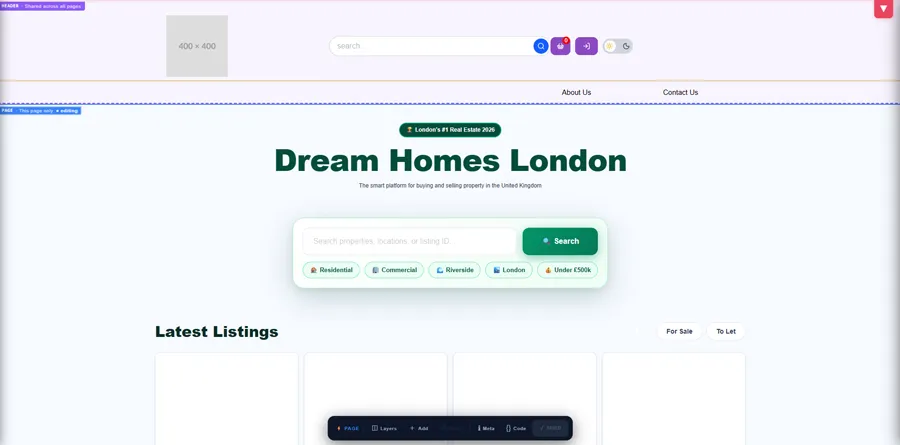
Changing Background Images and Colors
Visual appearance plays an important role in creating a professional website. With Webruno Page Builder, you can easily customize the background of each section and create a design that matches your brand style.
For any section, you can access the style settings and modify the background options. If a template includes a background image that does not match your business, you can remove it and replace it with a different style.
You can customize backgrounds by:
- Removing existing background images
- Uploading your own images
- Changing background colors
- Applying custom color codes
- Creating a consistent color theme across your website
Webruno also provides a color picker tool that makes selecting the right colors easier. You can choose colors visually or enter specific color codes to maintain accurate brand consistency.
Using custom color codes is especially useful for businesses that already have a defined visual identity. By applying the same colors throughout your website, you can create a more professional and recognizable brand experience.
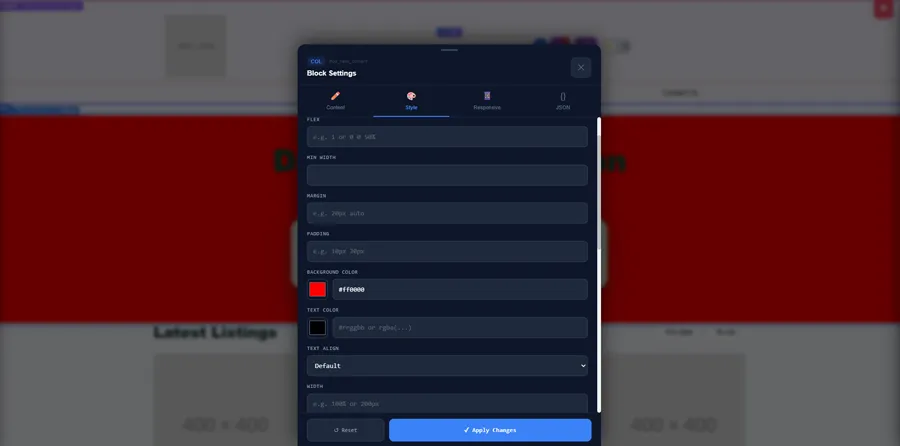
Customizing Buttons and Navigation Elements
Buttons are one of the most important elements of a website because they guide visitors toward specific actions. In Webruno Page Builder, you can easily customize buttons and navigation elements to improve user experience and increase conversions.
You can select any button on your page and access its settings to make changes. This allows you to control both the appearance and functionality of your buttons.
You can customize buttons by:
- Changing button text
- Updating button links
- Adjusting background colors
- Modifying button styles
- Changing size and alignment
- Creating different button designs for different sections
For example, you can change a default button link and connect it to another page, a product page, a contact form, or any other destination you need.
Webruno also gives you control over navigation elements such as headers and menus. You can manage different navigation items, update links, and customize the appearance of your website header.
By properly organizing navigation elements, you can help visitors find important pages faster and create a smoother browsing experience.
With these customization features, Webruno Page Builder allows you to create a website that looks professional, matches your brand, and provides a better experience for your visitors without needing any technical knowledge.
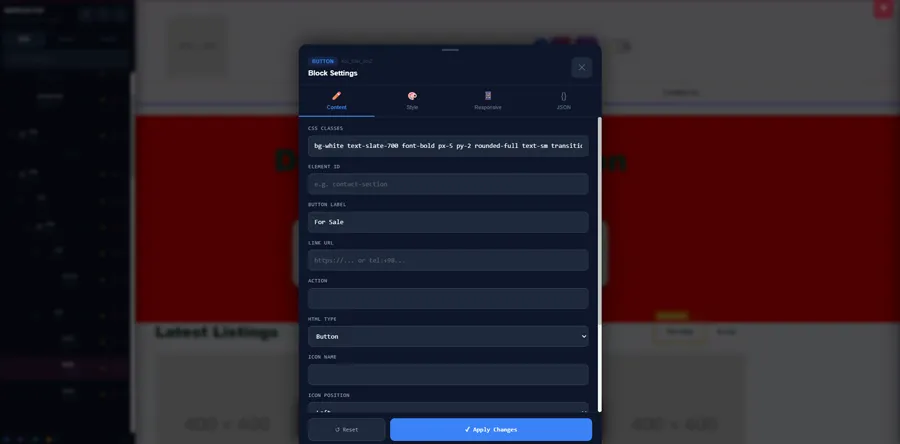
Changing Templates and Customizing Your Website Layout
One of the advantages of using Webruno Page Builder is the ability to change your website structure whenever you need. Whether you want to try a different style, create a new layout, or completely redesign your website from the beginning, Webruno gives you the flexibility to customize your pages based on your business goals.
Instead of being limited to one design, you can explore different templates, remove existing sections, and build a unique website layout that matches your brand. This makes it easier to create a professional website that can grow and change as your business develops.
Choosing a New Website Template
Sometimes, the first template you choose may not be the perfect fit for your business. With Webruno, you can easily return to the template selection section and explore different designs without needing to rebuild everything manually.
From the templates area, you can review different website styles and choose a design that better matches your business type. Whether you are creating an online store, a professional business website, or a personal brand website, Webruno provides different options to help you get started faster.
When choosing a new template, you can consider factors such as:
- The overall design style and visual appearance
- The structure of the homepage
- The way products or services are displayed
- The navigation experience for visitors
- Mobile responsiveness and user experience
For ecommerce businesses, store templates can provide ready made sections designed for displaying products, categories, and customer information. Business templates, on the other hand, are designed to highlight services, company information, and customer engagement.
By selecting the right template, you can save time during the design process and start with a strong foundation that can be customized according to your needs.
Removing Existing Sections and Starting From Scratch
While templates help you build websites faster, sometimes you may want complete control over every part of your page. Webruno allows you to remove existing sections and create a completely custom layout from an empty page.
If you want to design your website from the beginning, you can delete pre built sections and clear the existing page structure. This gives you a blank canvas where you can add only the elements you need.
Starting from scratch allows you to:
- Create a completely unique website design
- Build custom page structures
- Add only the sections that support your goals
- Control every part of the user experience
- Design pages based on your specific business requirements
After removing unnecessary sections, you can begin adding new rows, columns, text blocks, images, buttons, and other elements using the Page Builder tools.
This approach is especially useful for businesses that need a custom website layout instead of a standard template design. With Webruno, you can combine the speed of templates with the flexibility of custom design to create a professional website that fits your exact vision.
Building a Website Page from Scratch with Webruno
While templates provide a quick way to start building a website, Webruno also gives you the freedom to create completely custom pages from scratch. This option is useful when you want full control over your website structure, layout, and content.
With Webruno Page Builder, you can build your page step by step by adding different sections, organizing content areas, and customizing every element according to your business needs.
Creating a page from scratch may seem complicated at first, but Webruno simplifies the process with a visual editor. You can add elements, move them with drag and drop, and create professional layouts without writing code.
Adding Rows and Columns
The foundation of every well structured webpage is a clear layout. In Webruno Page Builder, rows and columns help you organize different elements and create a balanced page structure.
To start designing a new page, you can add a new row and define the main structure of your section. Rows act as containers where you can place different content elements, while columns help divide the space inside each row.
With rows and columns, you can:
- Create different sections for your page
- Divide content into multiple areas
- Arrange images, text, and buttons professionally
- Build layouts similar to modern websites
For example, you can create a two column section where one side contains text and the other side contains an image. You can also create multiple columns to display services, features, products, or other important information.
This grid based approach helps you maintain a clean design and ensures that your website content is organized properly across different screen sizes.
Adding Content Elements to Your Page
After creating your page structure with rows and columns, you can start adding content elements to build your website.
Webruno Page Builder allows you to add different components directly into your layout. Each element can be customized based on your design preferences and content requirements.
You can add elements such as:
- Paragraphs for descriptions and website content
- Headings to organize information and improve readability
- Images to create visual impact
- Buttons to guide visitors toward specific actions
- Other page elements to improve functionality and user experience
For example, you can create a homepage section by adding a heading that introduces your business, a paragraph explaining your services, an image that represents your brand, and a button that encourages visitors to take action.
Each element can be edited through its settings panel, allowing you to adjust text, style, position, and appearance.
This flexibility allows you to create pages that are not only visually attractive but also designed around your business objectives.
Customizing Page Width and Spacing
A professional website requires more than just adding content. Proper spacing and layout control are essential for creating a clean and comfortable user experience.
Webruno allows you to customize the width and spacing of different sections to achieve a professional layout.
You can adjust settings such as:
- Maximum width of page sections
- Margins around elements
- Padding inside sections
- Alignment and spacing between components
For example, setting an appropriate maximum width helps prevent content from becoming too stretched on large screens. Proper padding and margins create enough space between elements, making the page easier to read and navigate.
These layout controls also help you create responsive sections that work correctly on different devices, including desktops, tablets, and mobile phones.
By combining rows, columns, content elements, and spacing settings, you can build a complete website page from scratch with Webruno while maintaining a professional design structure and a smooth user experience.
Understanding Page Structure and Layout Control
Creating a professional website is not only about adding content and visual elements. The way different parts of a page are organized has a major impact on user experience, readability, and overall design quality.
Webruno Page Builder gives you complete control over your page structure by allowing you to manage sections, columns, and individual elements easily. With layout control tools, you can create organized pages that look professional across different devices.
Understanding how your page structure works helps you build cleaner designs, make future edits easier, and create a better experience for your visitors.
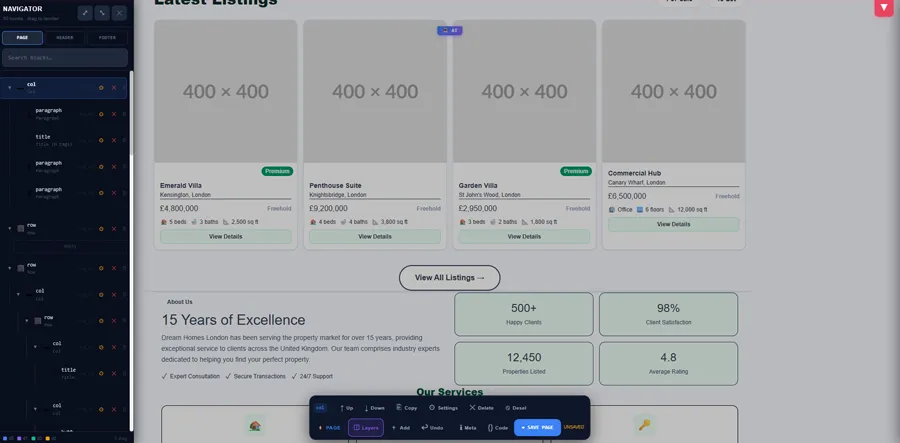
Managing Columns with Layers Panel
When building complex pages, finding and managing different elements can become challenging. Webruno solves this problem with the Layers Panel, which provides a clear view of all sections, rows, columns, and elements used on your page.
The Layers Panel allows you to quickly identify different parts of your website and manage them without searching through the visual layout manually.
Using the Layers Panel, you can:
- View all elements included in your page structure
- Find specific sections and components easily
- Select hidden or overlapping elements
- Change the order and position of different elements
- Manage the hierarchy of your page layout
For example, if multiple buttons, images, or text sections are placed close together, the Layers Panel helps you select the exact element you want to edit.
You can also use it to organize the structure of your page by moving elements to different positions or adjusting their relationship with other components.
This makes editing faster and gives you more control, especially when working on larger pages with multiple sections.
Creating Professional Website Layouts
A well designed website requires a balanced structure where content is organized in a clear and visually appealing way. With Webruno, you can create professional layouts by dividing your pages into different sections and columns.
By controlling the structure of your page, you can design layouts similar to modern professional websites without needing advanced coding knowledge.
You can create different layouts by:
- Dividing pages into multiple columns
- Creating sections for different types of content
- Placing text, images, and buttons in the right positions
- Building unique structures based on your business goals
For example, a homepage can include a large hero section with text and an image, a feature section with multiple columns, customer testimonials, and a call to action area. Each section can be designed separately while maintaining a consistent overall structure.
Webruno gives you full control over your page layout, allowing you to adjust every part of your website according to your preferences. You can change the position of elements, modify spacing, and create custom designs that match your brand style.
With this level of flexibility, businesses can build websites that are not only visually attractive but also easy to navigate and optimized for a better user experience.
Why Building Websites Manually Can Be Difficult
Building a website from scratch manually can be a challenging process, especially for people who do not have technical experience. Although custom development gives complete control over every detail, it often requires a significant amount of time, design knowledge, and technical skills.
Creating a professional website involves many different steps, including planning the layout, designing visual elements, organizing content, adjusting spacing, making the site responsive, and ensuring everything works correctly across different devices.
For many businesses, managing all these technical details can slow down the launch process and make website creation more complicated than expected.
Challenges of Manual Website Design
One of the biggest challenges of manual website design is the amount of time required to create every part of a website. From designing sections and arranging elements to writing code and testing different layouts, each step requires careful attention.
Businesses that need to launch quickly may find manual development too slow, especially when they need to make frequent changes or updates.
Another challenge is the need for design knowledge. Creating a website that looks professional requires an understanding of user experience, visual balance, typography, spacing, and responsive design principles.
Without proper design skills, websites may look inconsistent, difficult to navigate, or less effective at converting visitors into customers.
Layout customization can also become complicated when building websites manually. Developers need to carefully manage structures, columns, spacing, and element positioning to ensure the final result looks correct on different screen sizes.
Small changes that seem simple, such as moving an element, adjusting a section, or changing the design style, may require additional technical work.
How Webruno Makes Website Creation Easier
Webruno simplifies the website creation process by providing powerful tools that allow users to design professional websites without dealing with complex technical steps.
Instead of starting from zero, users can take advantage of ready made structures, templates, and visual editing tools to create websites faster and more efficiently.
With Webruno Page Builder, you can easily customize different parts of your website, including sections, images, text, buttons, and layouts. The drag and drop editor allows you to make changes visually without needing coding knowledge.
Webruno also helps reduce the complexity of website design by providing professional templates and flexible design elements that are ready to customize. This allows businesses to focus more on their content, branding, and growth rather than technical setup.
Another powerful feature is the ability to use AI tools during the design process. AI can help generate website structures, create layouts, and provide design ideas based on your business needs.
By combining visual editing, ready made components, and AI assisted design, Webruno makes it easier for businesses and individuals to create modern, professional websites faster and with less effort.
Using AI to Design Your Website Homepage with Webruno
Creating a professional homepage usually requires careful planning, design skills, and a clear understanding of user experience. However, with the help of artificial intelligence, the website design process has become much faster and easier.
Webruno Page Builder includes AI capabilities that help users create website structures and generate design ideas based on their business needs. Instead of manually creating every section from the beginning, you can use AI to create a strong foundation and then customize it according to your preferences.
AI assisted design helps businesses save time, explore creative possibilities, and build modern website layouts without needing advanced technical knowledge.
How Webruno AI Website Design Works
Webruno AI website design works by helping you generate website structures and design concepts directly inside the Page Builder environment.
The AI feature can analyze your requirements and create suggestions for different parts of your website, including homepage sections, content structure, and layout organization.
Instead of manually deciding where to place every element, AI can help create an initial design direction that you can edit and improve later.
One of the powerful advantages of this feature is flexibility. Webruno can work with different AI platforms, including popular tools such as Gemini, Claude, and DeepSeek. These AI tools can help generate design ideas, improve layouts, and create structured website content.
By combining Webruno Page Builder with AI technology, users can move from a simple idea to a complete website structure much faster.
Creating an AI Prompt for Your Website Design
To get better results from AI website design, providing clear and detailed instructions is essential. Webruno helps you create a structured prompt that includes the important information needed for generating your website design.
The prompt should include details about your business, website purpose, and design requirements.
For example, you can provide information such as:
- Your business type and industry
- The main purpose of your website
- The products or services you offer
- Your brand name
- Preferred design style
- Contact information
- Specific sections you want to include
For example, if you are creating an online store, you can explain that your website is designed for selling products, mention your brand identity, and describe the type of customer experience you want to create.
The more detailed your instructions are, the more accurate and useful the AI generated design will be.
A well prepared prompt helps AI understand your business goals and create a website structure that matches your needs.
Generating Website Design with External AI Tools
After creating the AI prompt in Webruno, you can copy the generated instructions and use them with external AI platforms such as Gemini, Claude, or DeepSeek.
These tools can analyze the prompt and generate website design suggestions based on the information provided.
The process is simple:
- Create your website design prompt in Webruno Page Builder.
- Copy the generated prompt.
- Paste it into your preferred AI tool.
- Receive AI generated design recommendations or website structures.
- Apply the suggested design in Webruno and customize it further.
This workflow allows you to combine the power of multiple AI tools with Webruno's visual website builder.
Instead of spending hours designing a homepage manually, you can use AI to create a professional starting point and then adjust every detail based on your brand identity.
With AI powered website design, Webruno helps businesses create modern, professional, and customized websites faster while keeping full control over the final result.
Applying AI Generated Website Design in Webruno
After generating a website design concept with AI tools, the next step is applying that design inside Webruno Page Builder. This process allows you to quickly transform AI generated ideas into a real website layout that you can edit, customize, and publish.
Instead of manually creating every section, AI can generate a complete page structure that includes different elements such as sections, columns, text areas, buttons, and visual layouts. You can then import this structure into Webruno and continue improving it based on your brand requirements.
This combination of AI generated designs and Webruno's flexible page builder gives you a faster way to create professional websites while maintaining full control over the final result.
Adding AI Generated JSON Code to Your Website
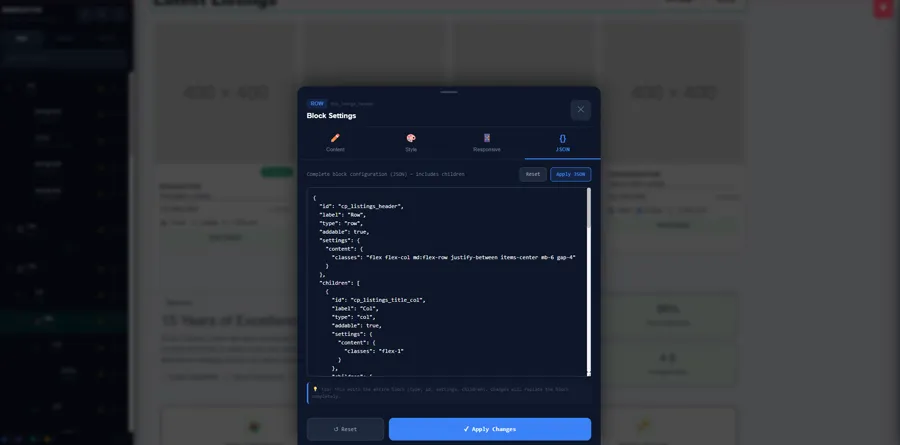
Webruno Page Builder allows you to apply AI generated website structures by using JSON code. This method makes it possible to transfer complete page designs created by AI directly into your website.
The process starts by receiving the generated design code from your chosen AI tool. The AI creates a structured JSON format that contains information about the page layout, sections, elements, and design settings.
To apply the AI generated design, you can:
- Receive the generated JSON code from the AI tool
- Open the page settings in Webruno Page Builder
- Insert the JSON code into the page structure section
- Apply the changes and preview the new design
After applying the JSON code, Webruno automatically creates the page structure based on the generated instructions. Sections, columns, and different design elements will be added according to the AI generated layout.
This process saves significant time because you do not need to manually build every part of the page. Instead, you can start with an AI generated foundation and focus on improving the design.
Reviewing and Customizing AI Website Results
Although AI can create a strong starting point for your website, reviewing and customizing the final design is an important step. Every business has unique branding requirements, so the generated design may need some adjustments before publishing.
After applying the AI generated layout, you can review different sections of your website and make changes where needed.
You can customize:
- Website sections created by AI
- Text content and images
- Colors and design styles
- Buttons and navigation elements
- Section spacing and layout structure
AI may also generate additional elements such as headers and footers. You can review these parts and decide whether they match your website goals or need further editing.
For example, you can modify the header navigation, update footer information, change button links, or adjust the overall style to better match your brand identity.
The final customization stage allows you to combine the speed of AI with your own creative decisions. By reviewing and refining the AI generated design, you can create a professional website that looks unique and provides a better experience for your visitors.
With Webruno, AI becomes a powerful assistant in the design process, helping you build websites faster while keeping complete control over every detail.
Tips for Creating a Professional Website with Webruno
Creating a professional website is not only about adding attractive designs and modern features. A successful website should provide a smooth user experience, have a clear structure, load quickly, and help visitors easily find the information they need.
With Webruno, you have access to powerful design tools that make website creation easier. However, following some important design principles can help you create a website that looks more professional and delivers better results for your business.
Keep Your Design Simple and User Friendly
A simple and well organized design is one of the most important factors in creating a successful website. Visitors should be able to understand your website quickly and navigate through different sections without confusion.
A good user experience helps visitors stay longer on your website, interact with your content, and take important actions such as contacting your business or making a purchase.
When designing your website with Webruno, focus on:
- Creating clear navigation menus
- Using readable fonts and appropriate colors
- Organizing content into logical sections
- Highlighting important information
- Making buttons and actions easy to find
Avoid adding too many unnecessary elements, animations, or complex layouts that may distract visitors from your main message.
A clean design creates a more professional impression and allows users to focus on your products, services, and brand.
Optimize Your Website Structure
A professional website needs a strong structure behind its visual design. The way your pages, sections, and content are organized affects both user experience and search engine performance.
With Webruno, you can create organized page structures by using sections, rows, columns, and different content elements. A clear structure helps visitors move through your website more easily and helps search engines better understand your content.
Important factors for website structure include:
- Creating organized page sections
- Using clear headings and content hierarchy
- Optimizing images and website speed
- Ensuring mobile friendly layouts
- Following SEObest practices
Website speed and SEO are especially important for online growth. A fast website provides a better experience for visitors and can improve your visibility in search engine results.
By creating a structured and optimized website from the beginning, you build a stronger foundation for attracting visitors and growing your business online.
Combine AI Tools with Human Creativity
AI has made website creation faster and more accessible, but the best results come from combining artificial intelligence with human creativity.
Webruno allows you to use AI tools to generate website structures, design ideas, and content suggestions. This can save time and help you create a strong starting point for your website.
However, AI generated designs should always be reviewed and customized to match your brand identity.
You can improve AI generated results by:
- Adjusting colors and design styles
- Adding your own brand elements
- Editing content based on your audience
- Improving sections based on your business goals
- Creating a unique user experience
AI is a powerful assistant that helps speed up the design process, but your creativity and business knowledge are what make the final website unique.
By combining Webruno's visual tools, AI capabilities, and your own ideas, you can create a professional website that looks great, performs well, and supports long term business growth.
Continue Learning Webruno Website Builder
Building a professional website is a continuous learning process. While this guide showed you how to customize your website, create pages from scratch, and use AI tools with Webruno, there are many more features and possibilities you can explore.
If you have not completed the first part of this tutorial, we recommend starting with How to Build a Website with Webruno (Step-by-Step Tutorial) – Part 1. In the first part, you can learn the basics of creating a website, choosing a template, setting up your website foundation, and understanding the main tools inside Webruno.
After completing both parts, you can continue exploring other Webruno features to improve your website and grow your online business.
Some additional capabilities you can learn include:
- Managing your website pages and content more efficiently
- Using CRM tools to organize customer information
- Creating online stores and managing products
- Improving website performance and SEO
- Using marketing and automation features
- Building better customer communication strategies
By exploring more Webruno tutorials and features, you can take full advantage of the platform and create a website that is not only visually professional but also optimized for business growth.
Continue learning with Webruno and discover new ways to build, manage, and grow your online presence.
Frequently Asked Questions
Can I customize my website design in Webruno?
Yes, Webruno allows you to fully customize your website design according to your brand needs. You can edit different sections, change colors, update images, modify text, adjust layouts, and customize buttons using the visual Page Builder.
With the drag and drop editor, you can easily move elements, change the structure of your pages, and create a unique website design without starting from zero.
Do I need coding skills to edit my website?
No, you do not need coding skills to edit your website with Webruno. The Page Builder is designed for users who want to create and manage professional websites without writing code.
You can visually edit website sections, add new elements, customize layouts, and update content through simple tools. This makes website management easier for business owners, creators, and teams without technical backgrounds.
Can Webruno AI create a complete homepage?
Yes, Webruno AI can help you create a complete homepage structure based on your business requirements. By providing information about your business, website type, brand name, and design preferences, AI can generate a starting point for your homepage.
After generating the design, you can review, edit, and customize the result inside Webruno Page Builder to match your exact needs and brand identity.
Can I use my own AI tools with Webruno?
Yes, Webruno can work together with external AI tools such as Gemini, Claude, and DeepSeek. You can generate design ideas or website structures using these tools and then apply the results inside Webruno.
For example, you can create an AI generated website prompt, use it with your preferred AI platform, receive the generated design structure, and customize it further in Webruno.
Can I build a website from scratch with Webruno?
Yes, Webruno allows you to build a website from scratch without using ready made templates. You can create new pages, add rows and columns, insert different elements such as text, images, and buttons, and design your own layout.
The flexible Page Builder gives you full control over your website structure while making the design process simple and accessible. This allows you to create a completely customized website based on your business goals.
Final Thoughts: Build Professional Websites Faster with Webruno
Creating a professional website no longer requires advanced technical skills or long development processes. With Webruno, you can design, customize, and manage your website using powerful visual tools that make the entire process faster and easier.
Throughout this tutorial, we explored how Webruno helps you take full control of your website customization process. From editing existing sections and changing layouts to building pages from scratch, the Page Builder gives you the flexibility to create a website that matches your brand and business goals.
One of the biggest advantages of Webruno is the ability to design websites without coding. You can use the drag and drop editor, customize different elements, adjust page structures, and create professional layouts through a simple visual interface.
Webruno also gives you complete control over your website pages. You can add new sections, manage rows and columns, customize content elements, update designs, and create unique pages based on your specific needs. Whether you are building a business website, an online store, or a landing page, you have the tools to create a professional result.
Another powerful feature is AI assisted website generation. By combining Webruno with AI tools, you can create design ideas, generate page structures, and speed up the website creation process. AI helps you save time while still allowing you to review, customize, and improve the final design based on your vision.
The combination of visual editing, flexible customization, and AI powered design makes Webruno a complete solution for businesses that want to build websites faster and more efficiently.
Whether you are creating your first website or improving an existing online presence, Webruno helps you turn your ideas into a professional website without unnecessary complexity.
Ready to build your website with Webruno? Start creating your website today.
You are reading Part 2.
Click here to read Part 1.
▶️ Watch Part 1 on YouTube: How to Build a Website with Webruno (Step-by-Step Tutorial)
▶️ Watch Part 2 on YouTube: How to Customize Your Website with Webruno Page Builder